
This week AgentTacho, my small incubating macOS menu bar app for tracking agent usage, got a feature that refreshes its numbers whenever I open its menu. Before the merge, agents reviewed it at every stage: three rounds on the spec, three on the plan, two correctness checks during implementation, and a final code review by five specialized review agents plus CodeRabbit and Codex. Not one of those reviewers was a human. They reported 100% spec compliance, and all 978 tests passed. Then I opened the menu twice, and the second time nothing refreshed.
The second opening#
The walkthrough, the hands-on step at the end of my pipeline, had me open the menu, wait a minute, and open it again, while the agent watched the app’s log. The first opening refreshed the numbers, the second did nothing. With that log in front of it, the agent found the cause within minutes. The refresh was tied to the moment the menu is first built, and the app keeps the menu around after that, so the trigger never fired again. A second trigger fixed it, and the next two openings gave two refreshes.
So why did no reviewer catch it? The review agents read the code, and the code was correct line by line; the flaw only shows when someone clicks the menu. No reviewer can click anything. The agents that built the feature had seen that limit coming, though. Before any code existed, the implementation plan said about this trigger: “The walkthrough verifies that it fires on every opening.” The implementing agent listed it again in its final report, among the things it couldn’t check by hand. They didn’t know about the bug, but they knew where their checking ended, and they handed exactly that question to me.
Agent reviews never catch everything, and the only way I really learn to trust what my agents build is to try it myself.
Trust is the actual product#
Working with coding agents means building trust slowly, in the agents and in the tooling around them. Every feature that ships without surprises adds a little to it, and a single bad surprise can wipe out weeks of it. Addy Osmani put it well in his piece on agentic code review. The hard part of engineering, he writes, “moved from writing code to deciding whether to trust it.” He also warns about “borrowed confidence”, the comfort you get when one model approves what another model wrote.
Agent reviews give me exactly that borrowed kind. They read the code against the spec, and they’re good at it, but they never use the feature the way a person does. Without trying it, all I have left is hope, plus whatever trust I’ve built up so far. I made a similar point about knowledge in Know Your Limits: trust in AI output should rest on something you can check yourself.
So in my spec-driven setup, the last step before a merge is a guided walkthrough. The agents drive almost everything up to that point, and I’ve written a whole series about running them unsupervised. The walkthrough sits at the very end of that pipeline because it’s the one step that needs a human.
How a walkthrough works#
The walkthrough lives in cc-spex, my set of extensions for GitHub’s Spec Kit. The diagram below shows where it sits: the agents drive the whole pipeline, and only the final walkthrough step has a human in the loop.
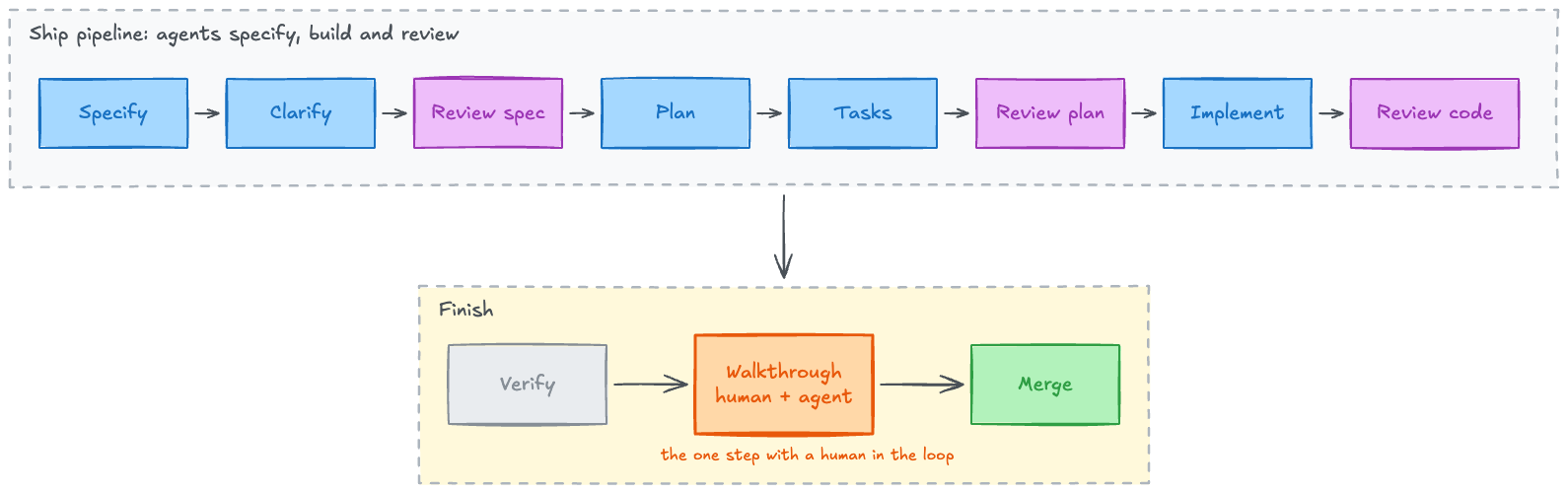
When the pipeline is done, the agent first decides whether there’s anything a person could try by hand.
A pure refactoring gets a one-line “not testable” and nothing else.
Everything else gets a RUNBOOK.md, a single journey through the feature in the order a user would take it.
Every step says why it matters, gives the exact command or the clicks, and states what you should see, written before anything runs.
An expectation written after the fact is just a copy of the output, so this order matters more than it looks.
Then the agent and I go through the runbook together. For each step I choose whether I run it myself (the command lands on my clipboard), whether the agent runs it, or whether the agent runs everything it can until it hits a step that needs me. In practice that last option does most of the work. The agent checks the mechanical things on its own, such as the tests, the build, the logs, and the files a feature writes, and stops wherever a person has to click, look, or judge.
That doesn’t mean I skip the agent’s steps. Reading them is part of the trust. When the agent runs a step, it shows the exact command, the real output, and a line-by-line comparison with the runbook’s expectation. That way I see what it counts as proof. Here is the step from the beginning of this post, as the walkthrough showed it:
Step 4 of 12: Open the menu after a minute

Do: open the menu, wait a minute, open it again.
What you should see (written before the run):
  a new "trigger dropdownOpen, endpoint fetched"
  line for every opening.
If you see something else: no line at all means
  the open trigger did not fire.

$ rg "trigger dropdownOpen" \
    ~/Library/Logs/agenttacho/usage.log | tail -n 1
07:33:08Z [refresh] done in 2.153 s, ...
          trigger dropdownOpen, endpoint fetched

Expected vs actual:
✔ 1st opening: refresh line at 07:33:08
✘ 2nd opening: newest line is still 07:33:08
Step 4: failed
I did the clicking, and the agent ran the command. The newest refresh line was still the one from the first opening, which is exactly the symptom the runbook had described before anything ran. After the fix, the agent rebuilt the app and we repeated the step:
Step 4 of 12: retry after the fix

$ rg "trigger dropdownOpen" \
    ~/Library/Logs/agenttacho/usage.log | tail -n 2
07:37:59Z [refresh] done in 2.684 s, ...
          trigger dropdownOpen, endpoint fetched
07:40:39Z [refresh] done in 2.336 s, ...
          trigger dropdownOpen, endpoint fetched

Expected vs actual:
✔ 1st opening: refresh line at 07:37:59
✔ 2nd opening: refresh line at 07:40:39
Step 4: passed (after a fix)
Two openings, two refresh lines. After a few of those blocks I know which log line means “it works”, and I know the agent isn’t just telling me it does.
The format has a history, by the way. The first version produced neat summary cards of what the agent had done, and I couldn’t tell from them what the feature did or what good output looked like. A summary of output is still borrowed confidence, so the rewrite kept one rule above all others: always show the real output, never a summary of it.
Where it pays off most: what you see#
Showing real output matters most when the thing being judged is visual. With a UI, “works” isn’t the whole question; it also has to feel right, and that’s very hard to specify upfront without seeing it. Earlier AgentTacho walkthroughs changed features in ways no agent review would have. The pace forecast first showed an extra text line under every row. It looked fine in the spec but took far too much room in the real menu, so it turned into a small pace meter while I was looking at it. A checkbox label, “Also show ⚠ / ‼ symbols”, made no sense next to the other option once I saw them together, and became “Mark levels with ⚠ / ‼”. These are small things, a label here and a row there, and every agent review had blessed them.
It’s also fun, which I didn’t expect to write in a post about quality gates. The walkthrough is often the first time I see a feature in action. The agent sits next to me like a colleague who built it and wants to show it off.
Beyond looking: the agent builds the workshop#
For many features, the hard part isn’t looking but setting the stage, and that’s where the agent surprised me most. Before a single step can run, a lot of features need an environment that would take me an afternoon to build by hand.
OpenShell, NVIDIA’s sandbox project for agents, is the heavy case. Trying its SPIFFE/SPIRE support means a Kubernetes cluster with a SPIRE server, SPIRE agents, and registration entries before there’s anything to look at. The agent builds all of that as the walkthrough’s test environment, records how to tear it down, and asks before it starts anything slow or anything that costs money. I get to spend my time on the interesting part, checking the identities the sandboxes get, instead of on the setup.
AgentTacho’s auto-update feature needed something else entirely: a newer release to auto-update to. The runbook had the agent create a throwaway GitHub repository, build and notarize a test release 0.9.0, publish it there, and point a special test build at it. I clicked “Install” in the menu, the app replaced and relaunched itself, and in a later step the agent published a tampered release that the app had to refuse. At the end it deleted the test repository and the local tags again, so nothing was left behind.
Even behavior that is hard to provoke gets a creative step.
For AgentTacho’s adaptive refresh, Low Power Mode was just a switch in System Settings.
But showing that agent work speeds the refresh up again needed fresh usage, so the runbook planned a one-line claude -p prompt to create some.
That step never ran, though.
It needed 20 quiet minutes with no agent working first.
But the walkthrough itself counts as activity, so the runbook marks it and the two steps before it as skipped, not passed.
Whatever the agent couldn’t provoke at all, like thermal pressure, it listed under “Not covered here”, together with the tests that cover it instead.
The agent handles the setup and gathers the evidence, and the human judges whether it’s what a user would want.
Not about the plugin#
None of this needs cc-spex. The pattern is small: before a merge, have the agent write a runbook with expectations stated upfront, prepare the environment, run it together, and record the real output. The portable place to make it part of “done” is AGENTS.md, the context file coding agents share and the subject of an earlier post. AgentTacho’s own AGENTS.md already lists the walkthrough as a workflow step. For a project without cc-spex, this is the gist of the walkthrough command, boiled down to what took me the longest to get right:
## Walkthrough before merge

A change is done when a person has tried it. Before
merging:

1. Decide if anything is user-observable (output, a
   file, an API answer, a screen). If not, say so in
   one line and stop. Cover what is testable and list
   the rest under "Not covered here", with the tests
   that cover it.
2. Write RUNBOOK.md: one journey in the order a user
   would take it. Every step has: Why, Needs, Run
   (exact command) or Do (clicks), "What you should
   see" (written BEFORE running), "If you see
   something else", and Result. Prerequisites are
   steps of their own. Read runtime values with
   commands, never use placeholders.
3. Set up what the runbook needs. Reuse services that
   already run. Start quick ones after one approval,
   ask before slow ones (say how long), and get an
   explicit yes for anything remote or paid. Record a
   teardown command for each.
4. Run it together, step by step. The person picks:
   run it myself (put the command on the clipboard),
   let the agent run it, run the rest until the first
   step that needs a person, or skip with a reason.
5. When the agent runs a step: show the exact command,
   the real output, and expected vs actual, one line
   per observation.
6. Never fabricate evidence. A step that could not
   really run is "skipped" with the reason, never
   "passed". Redact secrets.
7. On a mismatch: investigate, fix and retry only with
   a concrete cause, record and continue, or stop. If
   the runbook was wrong, fix the step and say so.
8. Record each result right away and end with a tally.
   If the code changed since the runbook was written,
   refresh the affected steps first.
Instructions like these are still prose, and agents tend to treat prose as a suggestion. That’s why cc-spex moves the bookkeeping into scripts: the step count, the results, the freshness check, the runbook structure, and the fixtures. The AGENTS.md version gets you the habit, and the scripts make it stick.
I’ll keep running all my review agents, and they’ll keep finding things. They’re the inspection report, and I wouldn’t move in without one. But trust comes from opening the door yourself, twice, with the builder standing right next to you.
Author: Roland Huß AIA HAb CeNc Hin R Claude Opus 5.5 v1.0