Track a proposal’s status
Pasting your texts into the conference form isn’t the end of a proposal. After that, it can still be accepted, rejected, withdrawn, or presented. When you record each of these steps in cfp, your store knows where every proposal stands, and three features build on that. The submission limit counts the proposals you’ve recorded for an event. An accepted proposal becomes a calibration example in its profile. A presented proposal adds an outing to its talk.
This page picks up Ada Example’s practice proposal kubecon-eu-2027—safe-node-drains, which she recorded as submitted at the end of Pre-flight, counts, and the paste view.
All of it runs through one command, /cfp:status, with three subactions: list, set, and reopen.
The seven statuses
Every proposal has one of seven statuses: draft, ready, submitted, accepted, presented, rejected, and withdrawn.
A new proposal starts as draft.
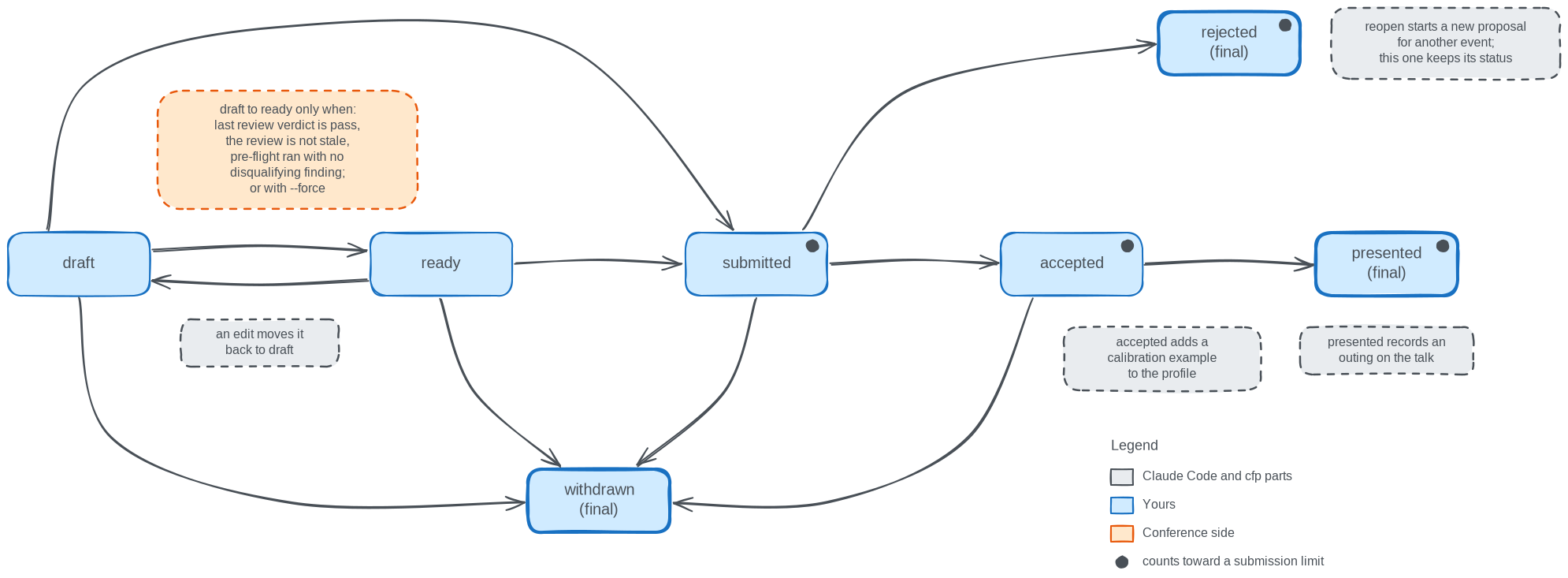
Read the diagram from left to right.
A draft moves on to ready, or straight to submitted.
A ready proposal can go back to draft.
After submitted come accepted and rejected, and accepted leads to presented.
You can withdraw a proposal from draft, ready, submitted, or accepted, for example when you cancel after acceptance.
presented, rejected, and withdrawn are final: cfp allows no move out of them.
The dots mark the statuses that count toward a submission limit, and Which statuses count toward a submission limit covers them.
The notes in the diagram are explained in the sections below: the ready check, edits of a ready proposal, what accepted and presented do, and reopening.
The reopen note sits next to rejected, but reopening is meant for withdrawn proposals, too.
See where your proposals stand
Before you change anything, it helps to see the whole picture.
/cfp:status list shows all your proposals grouped by status, and /cfp:status without arguments does the same.
-
In Claude Code, list your proposals:
/cfp:status listAdd
--status <status>to see a single group, for example/cfp:status list --status submitted.Check:
cfpshows one table per status that has proposals, in the order draft, ready, submitted, accepted, presented, rejected, withdrawn, and Ada’s proposal sits in thesubmittedtable. The last lines give the total for each status.
Each table has the columns Id, Title, Profile, Event, Session type, Date, and Days to close. The Date column changes its meaning with the status:
-
draft: the last update; -
ready: the day the proposal became ready; -
submitted: the submission date; -
accepted,rejected, andwithdrawn: the decision date; -
presented: the day you presented.
Days to close is filled in only for draft and ready proposals.
A CFP that has closed shows as closed (N days ago).
When a draft or ready proposal’s CFP has closed, the list ends with a reminder that you can reopen it for a later edition with /cfp:status reopen <id>.
If some proposal files can’t be read, cfp reports each one once with its path and error, then lists the rest.
Change a status
Every status change is one command with the proposal id and the new status. Recording it with the right date keeps the Date column of the list accurate.
For every status except draft, cfp records the status date as today’s date unless you pass --date <YYYY-MM-DD>.
A date cfp can’t read as YYYY-MM-DD gets you a question for the date again.
Let’s record a decision for Ada.
Say the committee turns her practice proposal down on 2026-12-07, the notification date of the kubecon-eu-2027 edition.
-
In Claude Code, record the decision with its date:
/cfp:status set kubecon-eu-2027--safe-node-drains rejected --date 2026-12-07Check:
cfpshows the old statussubmitted, the new statusrejected, and the date 2026-12-07. -
Look at the result from your cc-cfp clone with the store CLI.
Check: Ada’s proposal is listed among the rejected proposals.
python3 -I cfp/scripts/cfp_store.py proposal list --status rejected
What if you ask for a move the diagram doesn’t show?
cfp explains the current status and the allowed targets.
When there are any, it asks which one to apply, with none as a way out.
A final status has no allowed targets, so there’s nothing to pick.
A status that isn’t one of the seven gets you the table of subactions and a question.
Set a proposal ready
ready ties a proposal to a passing committee review and a clean pre-flight of the text that was reviewed.
/cfp:draft sets it for you when the checks pass, as Pre-flight, counts, and the paste view describes.
You can also set it yourself.
-
In Claude Code, ask for
ready:/cfp:status set <id> readycfpruns the ready check first. When the check passes, the proposal becomesready. -
When the check finds reasons against it, cfp lists them and offers three choices:
force ready,run /cfp:check first, andstop. The reasons themselves are explained in Pre-flight, counts, and the paste view.force readysetsreadywithout the review and pre-flight checks. Behind the scenes, cfp reruns the store command with--force.run /cfp:check firstruns the pre-flight on this proposal, then asks again.stopleaves the proposal as it is.Check: after
force ready, cfp shows the new statusreadyand the side effect "ready was forced without the review and pre-flight checks".
ready doesn’t survive an edit.
A content edit of a ready proposal sends it back to draft with stale checks, and Edit a ready proposal tells you what that means for the next review.
You can also move a ready proposal back to draft yourself, for example to rework it:
/cfp:status set <id> draftcfp then clears the ready date and marks the checks stale.
Run the committee review and the pre-flight again before you set it ready.
What accepted and presented do
Most status changes only update the proposal. Two of them change other parts of your store, and cfp lists each of these side effects as its own bullet and explains it.
accepted-
cfpadds the proposal’s title, abstract, and the text of its relevance field to the profile as a calibration example with the originown-accepted. The side effect names the new example file. Accepted proposals as calibration examples shows how the committee review uses it. presented-
cfprecords an outing of kindpresentedon the proposal’s talk, with the event, the profile, and the status date. With that outing, the one-year repeat rule applies when you propose the talk again; Pre-flight, counts, and the paste view explains the rule. Pass--datewhen you gave the talk on another day.
/cfp:status set <id> accepted
/cfp:status set <id> presented --date <YYYY-MM-DD>
Check: after each command, cfp lists the side effect, for example "recorded presented outing on talk <talk> (<event>, <date>)" for presented.
Which statuses count toward a submission limit
A profile can cap how many of your proposals one event takes, and the pre-flight checks that cap.
When cfp counts, it takes your proposals for the same event with the status submitted, accepted, rejected, or presented, and counts each proposal id once.
draft, ready, and withdrawn proposals don’t count.
That has two practical consequences.
A proposal you’ve sent off but not recorded as submitted is missing from the count, so record it.
A proposal you withdraw stops counting, while a rejected one still counts.
Reopen a rejected proposal for another event
A rejected proposal still has a talk behind it.
Reopening starts a new draft from that talk for another event, so you don’t begin from an empty page.
Reopening is meant for rejected and withdrawn proposals.
For any other status, cfp warns you and asks whether to continue anyway.
That includes a draft or ready proposal whose CFP has closed, even though the list suggests reopening it.
-
In Claude Code, reopen Ada’s proposal:
/cfp:status reopen kubecon-eu-2027--safe-node-drainsAdd
--event <id>when you already know the target edition.Check:
cfpshows the old title, the abstract, and the reviewer-only relevance text, and names the talk the new draft reuses as is. -
Pick the target event.
cfpoffers the other events of the same profile with their CFP close date and days to close, marks the closed ones, and addsanother profile. If no event fits, continue with the profile only:/cfp:draftoffers to create the event inline. -
Draft the new proposal.
cfphands over to/cfp:draftwith the talk, the profile, and the target event, and the old texts stay available for reference while you draft. Draft a proposal walks you through the rest.Check: when the draft flow returns, cfp reminds you that the source proposal is still
rejectedand that the repeat rule treats a rejected proposal as not presented.
Reopening never changes the source proposal.
Ada’s kubecon-eu-2027—safe-node-drains stays rejected, and the new draft is a proposal of its own for the new event.